For a long time, I have wanted to develop my own diff tool, but unfortunately, I am not an expert on diffing. I decided to use Claude to develop a desktop application as a side-project to test out Claude’s code generation skills and see how far I would get.
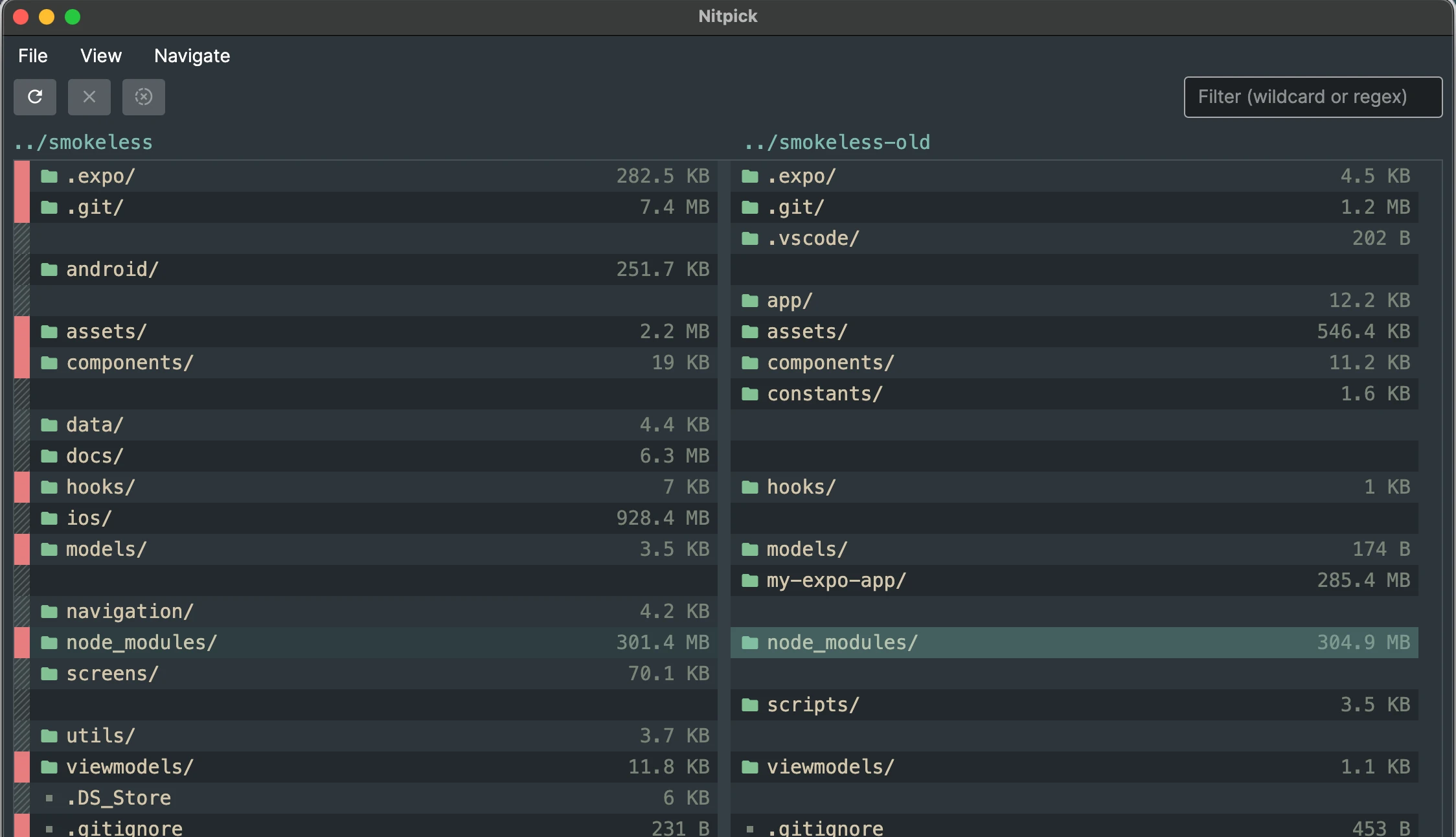
The side-project is called NitPick. The tool can diff folders and small files and have a couple of filters applied (show only differences for example):
Tech
The main language is going to be C#. It is the language I am most proficient so it is the most logical choice. However, I know next to nothing about developing desktop applications and UI frameworks anymore.
Initially, I went with Terminal.Gui. It looks pretty good in the screenshots and works pretty decently, but I wanted to switch to something out of the terminal and asked Claude for a replacement. Claude suggested Avalonia - seemed fine to me, so that is what we are using.
First implementation
The initial implementation only compared two folders. Claude generated code that consisted of a main window and two list boxes. Each list box had a custom drawn list item so that background colors and icons could be rendered.
There were some problems with this implementation:
Using the scrollbar on one of the list boxes would not move the scrollbar ofg the other side also.
Additionally, if a file exists on one side but not on the other, there should be a gap. Claude turned this into an empty list box item and was selectable.
Lastly, selecting a file would only select an item on the list box where the user clicked on. It would not select the whole line across both directories.
I chucked this information into a Claude chat window and asked in a vibe-coding way to “fix it & no mistakes” which resulted in some wild code with an EventManager that would pass scrollbar and selection events back and forth. Seemed a bit weird and it also did not work correctly.
After the initial implementation
The listbox approach was pretty horrible, and I had a look at the code it generated (the only time, really) because I was fed up trying to explain everything to Claude. Custom drawing seemed the only option, and it still took me a bit of effort to convince Claude generate code for it. Claude really liked the list box approach.
I asked to apply the same pattern to the file diff view.
After that, it was a pretty nice ride to add new functionality
Pile on the features, please
Once the foundation is laid out, I mostly described the features I wanted to have to Claude. In some cases, there is still a lot of shaving to get the result I wanted, but in the end we got there.
This resulted in some nice features:
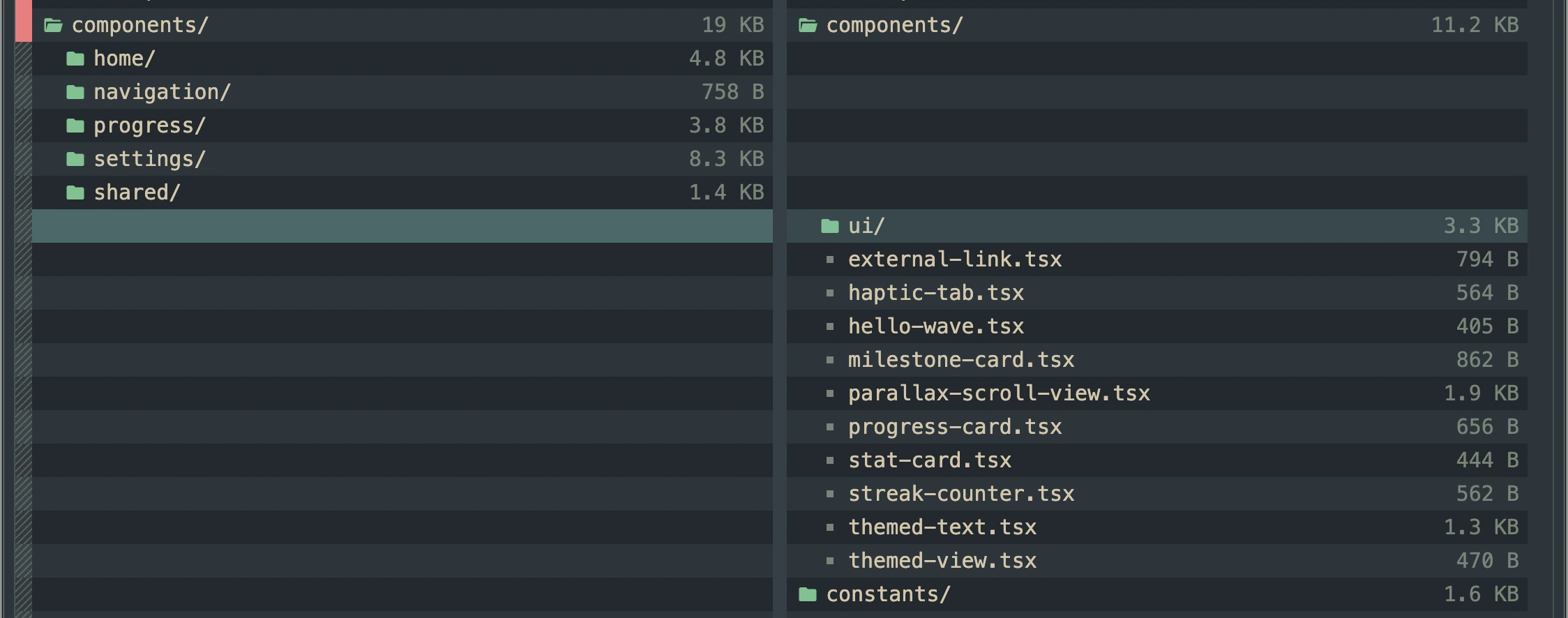
Collapse/Expand treeview in the listview.
The two listviews can expand on folder level and can compare the subfolders that way:
There were some performance issues on large folders. After Claude added a lot of logging, the following claims were made:
- It must be an issue in Rider (it wasn’t)
- It wasn’t a bug (not mentioned it was a feature though)
- There was an Exception overhead because threads were cancelled all the time
After some more persuading (“no mistakes this time”), Claude found that the thread pool was exhausted, causing everything to hang. After adding some throttling, everything was good.
Theming
I love the Everforest theme and I wanted to have it in Nitpick also. Implementing theming does not spark joy for me.
Claude did a pretty good job generating code for it. The theme colors are defined through a .json file per theme. There is a menu item per theme that allows live switching. The various Brushes for the custom diff controls are cached.
I am not 100% sure the colors are correct, but it’s good enough for now.
Filters & Searching
When the folders are very big, filtering and searching becomes a lot more important. I wanted to see all the differences for a complete folder tree or file diff and I wanted to be able to search.
Claude had no issue implementing the filtering & searching on the complete folder tree aside from a couple of UI mistakes. Things were not lining up correctly after a filter was applied.
Conclusion
Claude did a pretty good job at implementing most of the features without too many strange decisions. I think that if Nitpick would go to actual users, I would not be very comfortable maintaining or supporting the generated code. For this project, I only described all the features but I have no detailed idea on how the code is structured. This means that I also have no intuition on where things might go wrong when I see something going wrong.
Anyway, it will still be a long time before Nitpick is usable for other people. For now it is just a fun little side-project.